
Dynamic pricing

Prices that move – up and down

womoplus looks at your calendar every day: when the fleet at a location is full, the daily rate rises in the tiers you have set. When a gap is left between two bookings, it gets cheaper until it is gone. You set the limits, the software does the rest.

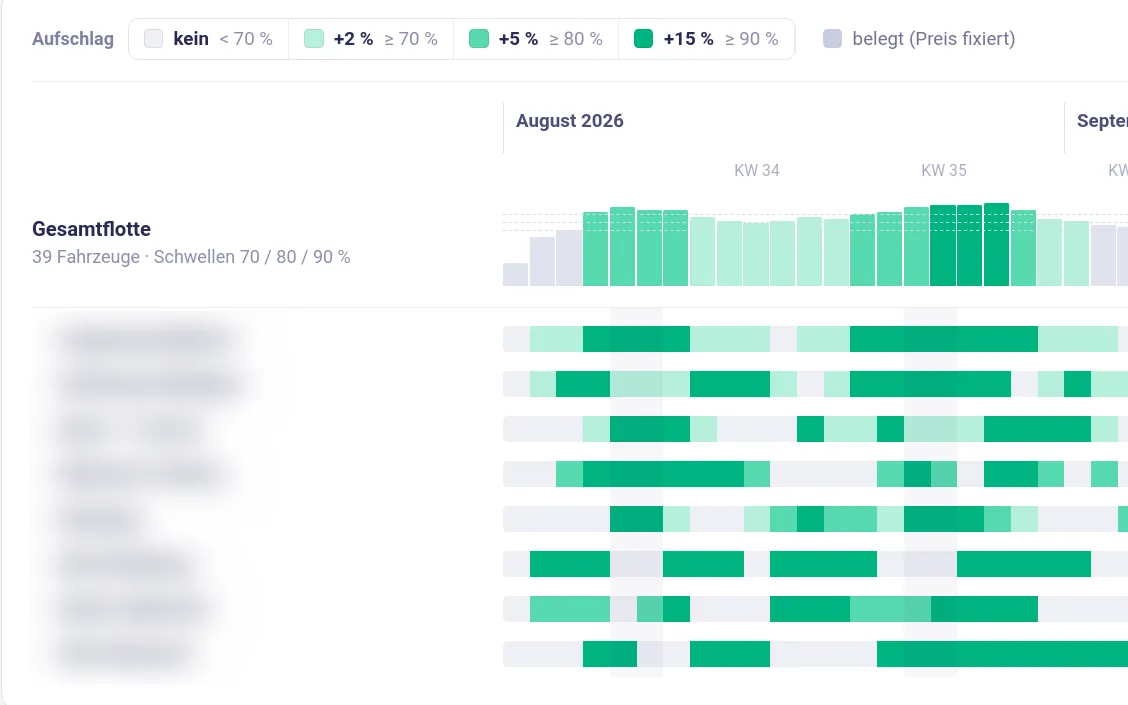
Section of the occupancy preview in womoplus: legend with the surcharge tiers, entire fleet with 39 vehicles and heatmap rows per fleet in August 2026

How it works

Pricing by occupancy and for leftover gaps

A surcharge when your fleet fills up – a discount for gaps that would otherwise stay empty. Both run on the same pricing rules and can be switched on separately.

Occupancy is counted per model and location

Occupancy is the share of your vehicles that are rented out on a given day – separately for each vehicle model and location. Someone looking for a campervan in Hamburg will not switch to an alcove motorhome in Munich. Example: five of your six campervans in Hamburg are rented out on Saturday. The price of the last free one goes up – no matter how busy Munich is. Vehicles that cannot be rented at the moment do not count.

You set the tiers

A tier consists of a threshold and a surcharge. An example with three tiers: from 70 % occupancy a day costs 2 % more, from 80 % it is 5 % and from 90 % 15 %. Below the lowest threshold your normal rate applies.

Figures as a table
ThresholdSurchargeEffect in the example
70 %+2 %€120.00 → €122.40
80 %+5 %€120.00 → €126.00
90 %+15 %€120.00 → €138.00
Effect of the tiers at a base rate of €120 per day.

One price per day, not per booking

For a longer rental, womoplus checks every day individually. If a fully booked weekend falls within the rental, only those days cost more – the quiet days before stay at the normal rate. So the guest only pays the surcharge where it is really tight.

Figures as a table
DayOccupancySurchargeDaily rate
Mon20 %–€120.00
Tue40 %–€120.00
Wed60 %–€120.00
Thu60 %–€120.00
Fri70 %+2 %€122.40
Sat80 %+5 %€126.00
Sun100 %+15 %€138.00
Mon100 %+15 %€138.00
Tue80 %+5 %€126.00
Wed70 %+2 %€122.40
Thu40 %–€120.00
Fri20 %–€120.00
Example with a base rate of €120 per day and the tiers 70 % → +2 %, 80 % → +5 %, 90 % → +15 %: 12 rental days, €1,440 at the base rate, €1,492.80 with the occupancy surcharge. Six days stay unchanged.

The next 90 days at a glance

The occupancy preview shows how busy your fleets are over the next 90 days. Each row is a fleet, each field a day, and the colour shows the tier reached. The entire fleet is at the top, the locations below – one click takes you down to the individual vehicle class. Change a threshold and the preview recolours instantly, so you see which days get more expensive before you save.

And down: a discount for leftover gaps

Between two bookings three or four days are often left – too short for the next enquiry. If a guest's preferred dates are taken, your booking portal suggests suitable periods nearby. An option that closes a gap exactly gets the full discount; if one or two days remain, correspondingly less. Free periods without a booking before and after do not count as a gap – your price stays as it is. So you never discount the free summer, only the leftovers.

  • Search windowHow many days before and after the requested dates the portal looks for alternatives.
  • Gap lengthUp to how many days a free period counts as a leftover gap.
  • Lead timeHow far in advance the discount applies.

Include or exclude platforms

For every rule you decide whether it also applies to bookings via platforms such as check24 or CamperDays or only to your own website – separately for the surcharge and the discount. Your platform prices stay as you calculated them, while your website responds to demand.

Different tiers for different fleets

A rule can apply to specific locations, vehicle models, categories, seasons, weekdays or rental durations. That way summer in Hamburg gets different tiers than winter in Munich. Rules are kept in a fixed order: for each vehicle womoplus takes the first one that matches. Surcharges therefore never add up.

Traceable in the back office

The price overview of every booking shows which rule applied and how much surcharge is included in the rental price. Your team can explain every price – even on the phone.

Read more

More from the suite

  • Planning board of the womoplus rental software with bookings per vehicle

    Rental software

    Planning board, cockpit, bookings, prices, emails and damages in one system – the basis for your occupancy-based pricing.

  • Online booking portal in three different designs

    Online booking portal

    This is where your guests see the daily rate and the alternatives for leftover gaps – in the design of your brand.

FAQ

Questions about dynamic pricing

Does an existing booking get more expensive if occupancy rises afterwards?

No. The price is fixed with the contract and is not recalculated later.

Does the guest see a surcharge listed?

No. They see one daily rate. The surcharge is included and only shown internally.

Can the price rise without limit?

No. Occupancy ends at 100 %, and the highest tier you set is the upper limit.

What happens on changeover days?

A vehicle counts as booked on every day a booking touches. On a day when one rental ends and the next begins, it is not available for a new full rental – and counts accordingly.

What if a date is both – full fleet and a precisely fitting leftover gap?

Then both can apply. The booking’s price overview shows exactly what ends up on the invoice.

Is it worth it for small fleets?

The larger the fleet per model and location, the finer the tiers. With one or two vehicles per class, occupancy jumps straight to 100 % – then set high thresholds or limit the rule to larger fleets.

All questions and answers

Get started

Set it up once, then it runs along

Create a rule, set two or three tiers, check the preview. From then on womoplus calculates every day – in the booking portal, in the back office and, if you like, on the platforms too.